
Last Updated on September 18, 2025
QuickBooks offers an add-on feature called Payroll to manage your business needs, such as direct deposit, sending paychecks, calculating taxes, printing and filing tax forms, and other similar tasks. You need to pay a subscription fee to avail this feature, which varies depending on the type of payroll you opt for. One such option is QuickBooks Assisted Payroll. With this option, QB automatically files the taxes and forms for you, gives you step-by-step guidance with the payroll setup, and lets you add as many employees as you want for just $2.50/employee per pay period. In this blog, we’ll cover the A to Zs of QuickBooks Desktop Assisted Payroll.
Need help in setting up QuickBooks Payroll? Contact our Accounting Helpline’s experts today to set up your payroll in no time!

What is Assisted Payroll in QuickBooks?
Assisted Payroll is a type of payroll subscription offered by Intuit to manage the user’s taxes and payroll needs. This subscription provides automated tax and form filings with an on-time and accuracy guarantee. Intuit would be liable to pay any penalties and charges if the payroll doesn’t do its job properly. So you just have to manage your accounting and bookkeeping tasks.
Key Advantages of QuickBooks Assisted Payroll
Listed below are some of the key benefits of subscribing to the QuickBooks Desktop Assisted Payroll:
- Automatically file taxes and forms through QB:
- This comes with an on-time and accuracy guarantee, or else QB will pay the penalties.
- QB provides you with step-by-step guidance in setting up the payroll.
- QB specialists will answer any questions you have regarding payday or any payroll processes.
- You can add as many employees as you want for just $2.50/employee per pay period.
These were some of the advantages of using the assisted payroll QuickBooks Desktop.
Extra Fees and Charges You Can Incur While Using the QuickBooks Desktop Payroll Assisted
In the table below are mentioned some of the extra fees and charges you might incur while using the QBDT Assisted Payroll:
| Fee For | Description | Fee Amount |
| Backdated or Late Payroll | Non-Sufficient Funds (NSF) Monthly Service Fee | $100 |
| Non sufficient Funds (NSF) Payroll | If the Payroll debits, including payroll taxes and payroll service fees, are returned by your financial institution due to insufficient or uncollected funds. | $100 |
| Direct Deposit Reversal | If you need to reverse your direct deposit for the paychecks sent by mistake. | $75 per payroll |
| If you request an additional copy of a current year payroll tax return. | If the monthly service fee is returned by your financial institution due to uncollected or insufficient funds. | $25 |
| Recovery of Data | If you request to create a new data file. | $150 |
| Return or Form Copies | If you request an additional copy of a current-year payroll tax return. | $25 per form |
| Old Return or Form Copies | If you request a change in EIN, ownership, or company type. | $100 per year + $25 per form |
| Year-End Filings with Cancellations | If you request the preparation of year-end filings when you cancel your payroll service. | $150 per cancellation |
| Amendments | If you request to change a prior tax return for any closed quarter. | $375 per amendment case for Wage & Tax $250 per amendment case for an employee |
| Legal Entity Change | If you request for a change in EIN, ownership, or company type. | No fee |
| Tax Notice | If you request assistance with the resolution of a tax notice received from a federal or state agency. | No fee |
| Corrections | If you request to correct your payroll setup. | No fee |
Now, let us discuss the requirements to use the QuickBooks Assisted Payroll.
Some Requirements for the QuickBooks Desktop Payroll Assisted
Given below are some of the requirements you need to fulfil to use the QB Desktop Assisted Payroll:
- You need to be using the QuickBooks Desktop Pro, Premier, or Enterprise version 2023 or higher:
- Payroll has been discontinued for QuickBooks versions 2022 or lower.
- You should have the Employee Identification Number (EIN) issued by the Internal Revenue Service (IRS).
- The EIN should be attested to all federal forms and return filings.
- You should have a stable and high-speed network connection.
- The QuickBooks Assisted Payroll is charged at $79 per month.
Let us now proceed to look at the steps you need to perform to set up the QB Payroll Assisted.
Activate and Set Up Assisted Payroll QuickBooks Desktop
Setting up QuickBooks assisted payroll is divided into two steps: first, activating the payroll subscription, and second, completing the payroll setup tasks. To activate your payroll subscription, follow these steps:
- Open your company file in QuickBooks Desktop.
- Navigate to the Employees menu.
- Click on Payroll.
- Then, click on Enter Payroll Service Key.

- Press Add.
- Now, type in your service key.
- Click on Next.
- Press Finish.
- Wait for the Tax Table to finish downloading.
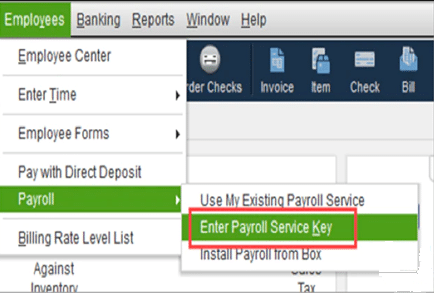
Performing these steps would activate the QuickBooks Assisted Payroll on your workstation. You can read our comprehensive guide to know the steps for QuickBooks Payroll setup.
Conclusion
In this blog, we talked about the QuickBooks Assisted Payroll and its several key benefits. Additionally, we also covered the steps to activate and set up the Assisted Payroll on your QB workstation. If you need any further assistance with setting up payroll or have any queries, feel free to contact our Accounting Helpline’s experts today at 1.855.738.2784!
FAQs
What are the different types of QuickBooks Payroll subscriptions offered by Intuit?
The different types of QB Payroll subscriptions offered by Intuit are Payroll Simple Start, Payroll Essentials, and Payroll Premium Plus.
What is QuickBooks Payroll Assisted?
QuickBooks Desktop Payroll Assisted is an automated payroll subscription, where QB handles and files all the payroll taxes for you, assuring accurate and timely payments.
What is the best payroll software for small businesses?
QuickBooks is widely used and regarded as the best software for small businesses for payroll services. It offers a variety of payroll subscriptions tailored to your needs.
Does Assisted Payroll work with Mac QuickBooks 2019?
No, as all QuickBooks versions prior to the 2023 version don’t support payroll anymore.
Related Posts-
Fix QuickBooks Error 3371 status code 11118/11104/1 With Hustle Free
What Steps to Follow When QuickBooks Won’t Open
QuickBooks Error 6000 83 – Description, Causes, and Quick Fix
QuickBooks Migration Failed Unexpectedly: Here’s What to Do Now
Expert-Approved Resolution Guide to QuickBooks Unrecoverable Error Codes
Know what to do when QuickBooks Hosting Mode is Off

Edward Martin is a Technical Content Writer for our leading Accounting firm. He has over 10 years of experience in QuickBooks and Xero. He has also worked with Sage, FreshBooks, and many other software platforms. Edward’s passion for clarity, accuracy, and innovation is evident in his writing. He is well versed in how to simplify complex technical concepts and turn them into easy-to-understand content for our readers.