

Last Updated on August 13, 2025
The QuickBooks Direct Deposit form is a document that is used by employees in order to authorize and receive paychecks automatically through the QuickBooks direct deposit service. The employee needs to feel and sign the form before handing it over to their employer, who then can deposit their wage straight into the bank account. For this, you need to download the Intuit Direct Deposit authorization form. In this blog, we’ll learn more about the QBO direct deposit form and how to download it.
Need help with filling out the QuickBooks direct deposit authorization form? Contact our Accounting Helpline experts at 1.855.738.2784, who can assist you with the process and ensure it goes smoothly.

Advantages of the QuickBooks Direct Deposit Authorization Form
There are several benefits for both the employer and employee in using the direct deposit form QuickBooks, such as:
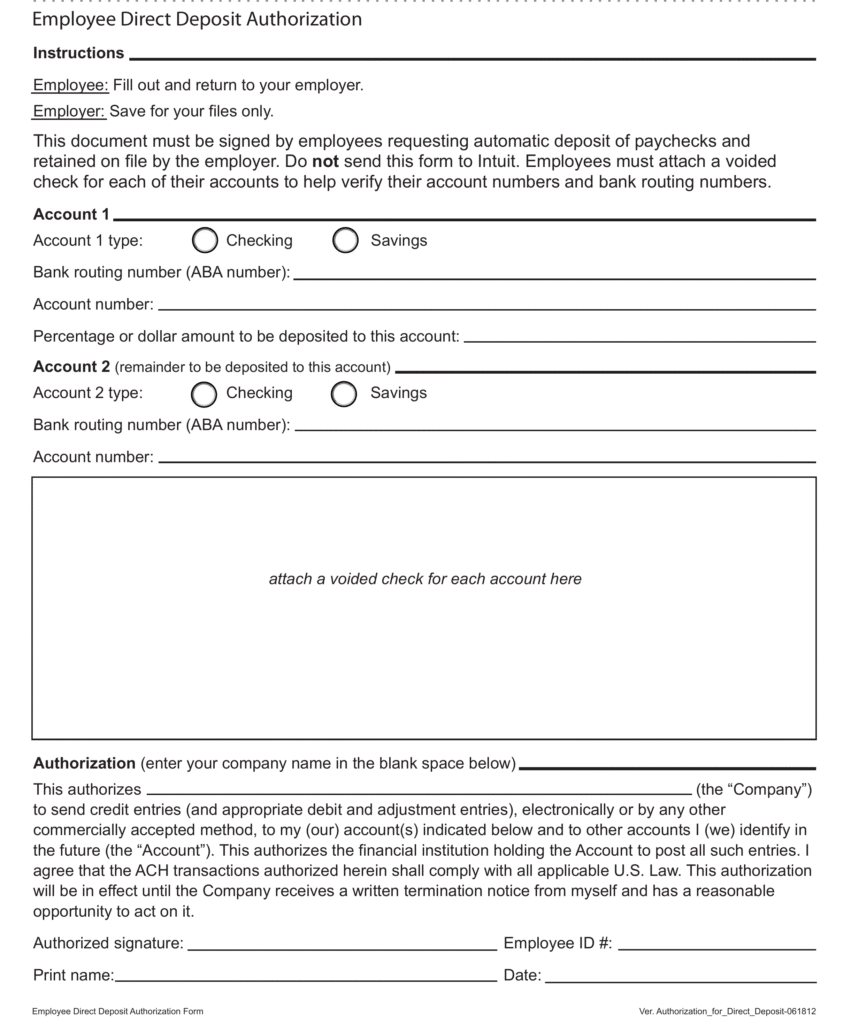
- It makes the payroll process much easier.
- It eliminates the need for physical checks.
- After filling out the Intuit Payroll Direct Deposit form, your employer can start the process of transferring the paycheck before the payday.
- The money is transferred directly to the employee’s account.
- Employees can have quick access to the funds.
Now, let’s take a look at the steps you need to perform for setting up direct deposit.
Set up Your Direct Deposit in the QuickBooks Application
Before you download the form to give it to your employees, it’s important first to set up your direct deposit. The process involves purchasing a payroll subscription, then setting up direct deposit, followed by verifying your bank account. After doing so, you can proceed to download the QuickBooks direct deposit form. Steps for doing the same have been given in the next section.
Steps to Download the QuickBooks Direct Deposit Form 2025
If you’re looking to download the QB direct deposit form, follow the steps given below:
- First, sign in to your QBO account.
- Navigate to the Payroll tab.
- Then, select Payroll Tax.
- Go to the Resources option.

- Now, scroll down and click on Setup Forms.

- Then, choose the Employee tab.

- Select the employee from the Employee dropdown menu.
- Now, move down to the Employee Bank Verification section.
- Hit View followed by Print.
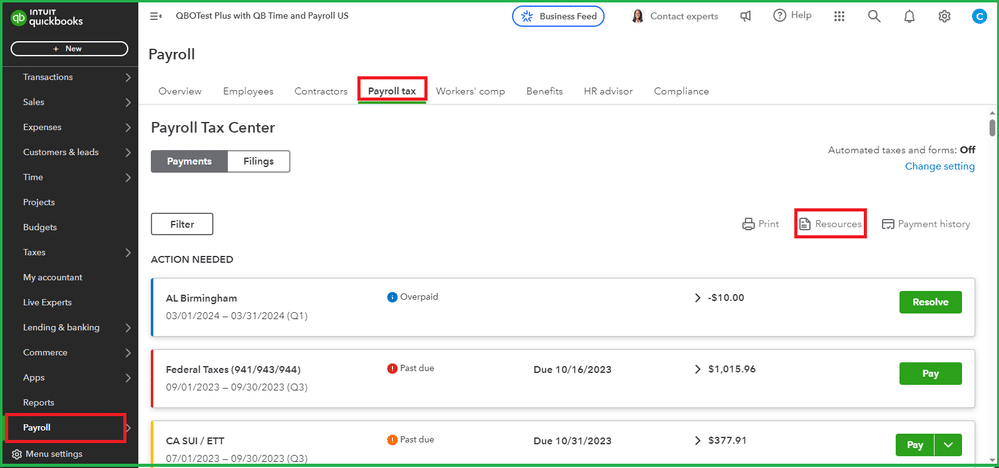
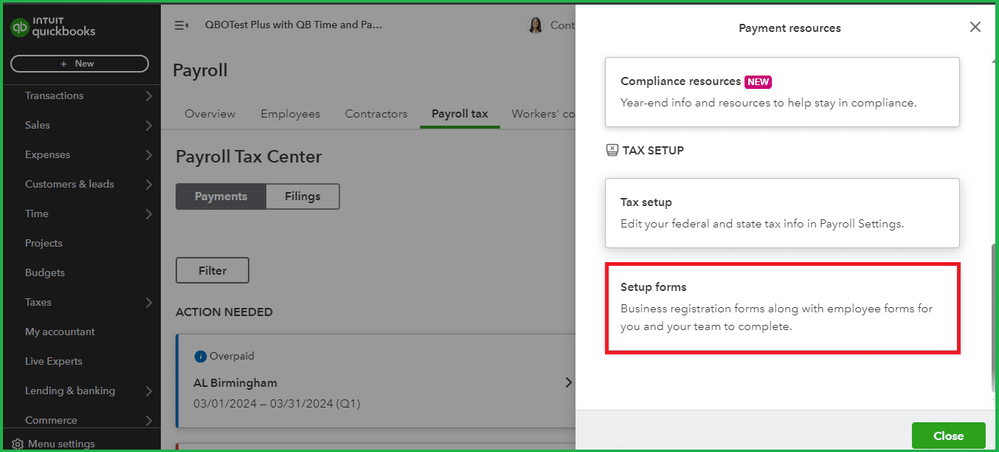
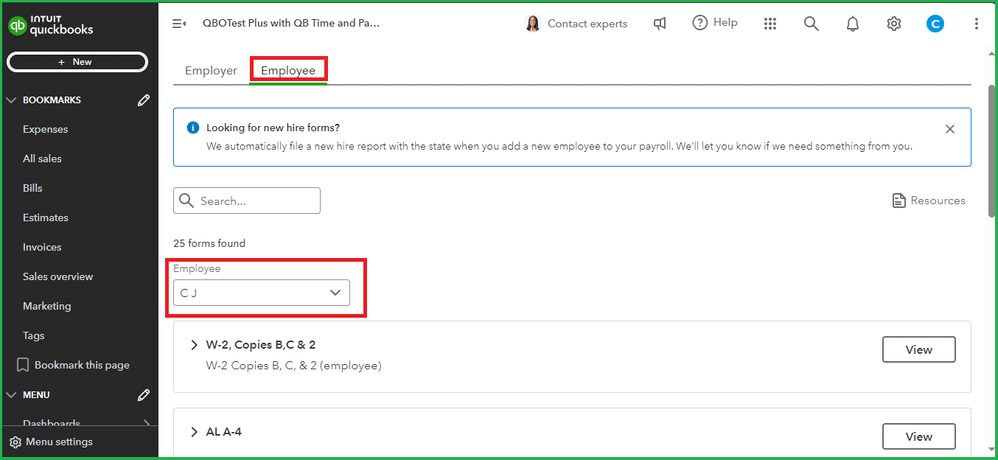
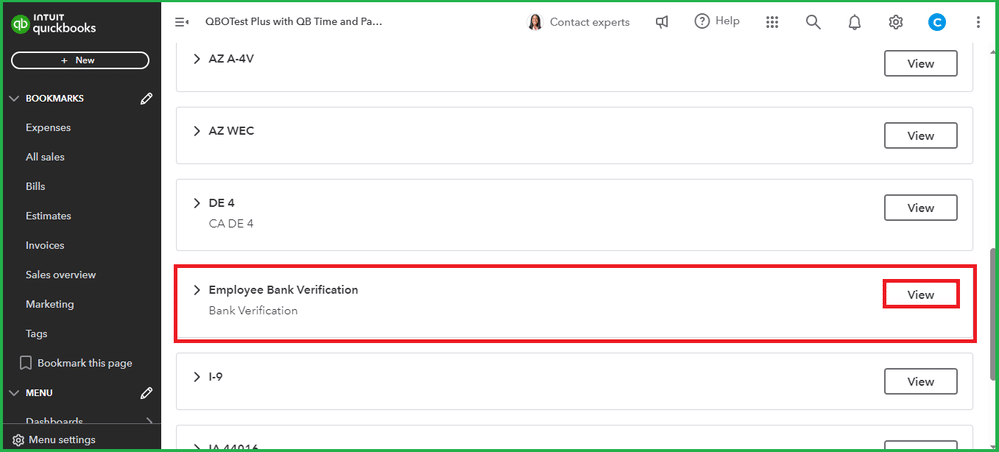
These were the steps to download the QuickBooks employee direct deposit form. Let us now see the information we need to have in hand before filling out the said form.
Information You Need for Filling the Intuit Direct Deposit Form
If you want to fill out the direct deposit QuickBooks form, you need to have the following information in hand:
- The name of your employer.
- The company name.
- Your account number.
- Your routing number.
- Second account and routing number, if you want to deposit the paycheck into two accounts.
This is the info you need to have before completing the QuickBooks Payroll Direct Deposit form.
Conclusion
In this blog, we discussed the QuickBooks Direct Deposit Form and the steps you can take to access it. If you need any additional help in setting up your direct deposit or connecting your employees with it, don’t hesitate to contact our Accounting Helpline’s experts at 1.855.738.2784 today. They’re here to help you with every step and to make sure the process is trouble-free.
FAQs
Where can I find the Intuit QuickBooks Direct Deposit form?
You can find the QuickBooks employee direct deposit form by first navigating to the Payroll menu and then clicking Payroll Tax. After that, you should select the Resources option and choose Setup Forms. Next, what you have to do is go to the Employee tab and click the Employee dropdown menu to select the employee name. Then, choose Employee Bank Verification and press View, followed by Print.
Is QuickBooks Direct Deposit Free?
Yes, for all QuickBooks Payroll service users, the QB direct deposit is a free add-on. However, Intuit charges on a transaction basis rather than asking for a subscription to use it.
What is the form for direct deposit?
A direct deposit authorization form is used to allow the third-party (your employer, in most cases) to transfer your paycheck straight into your bank account, which eliminates the need for physically printed checks.
What’s the deadline for direct deposit in QuickBooks?
For direct deposit in QuickBooks, there can be different deadlines according to your subscription plan. For example, for the same-day lead time, you should submit the payroll before 7:00 AM PT on the payday. For a one-day lead time, submit the payroll before 5:00 PM PT one day prior to your payday, and so on.
Related Posts-
How to End QuickBooks Error 15103 Completely?
Guide to Fix QBCFMonitorService Not Running On This Computer
An Expert’s Guide to Resolve QuickBooks Error 6000 80
QuickBooks Error H202 in Multi-User & Solutions to Fix it
How To Fix QuickBooks Error PS038? Easiest Method
QuickBooks Multi-User Mode Not Working: Fix Connection & Access Issues

Edward Martin is a Technical Content Writer for our leading Accounting firm. He has over 10 years of experience in QuickBooks and Xero. He has also worked with Sage, FreshBooks, and many other software platforms. Edward’s passion for clarity, accuracy, and innovation is evident in his writing. He is well versed in how to simplify complex technical concepts and turn them into easy-to-understand content for our readers.