

Last Updated on November 3, 2025
Sorry we need to verify your subscription QuickBooks is an error message that many users receive while installing or updating the QB Desktop application. This can be quite frustrating and annoying at the same time. You might get one of these three error messages while installing the QBDT app:
“Error: Sorry, we need to verify your subscription before installing QuickBooks Desktop.”
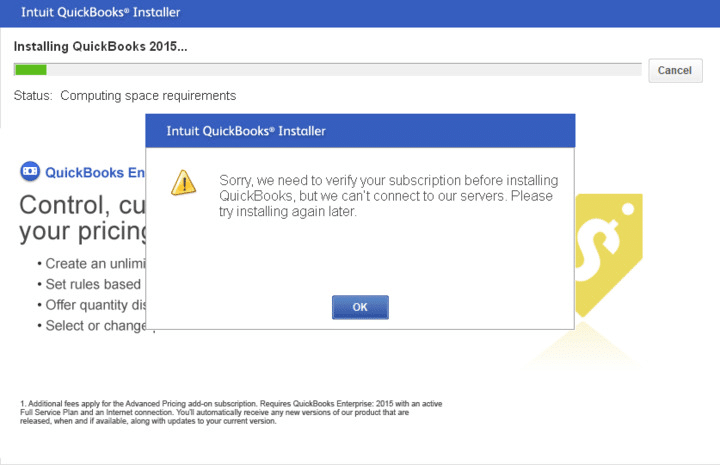
“Error: Sorry, it looks like you need a subscription to install QuickBooks Desktop.”
“Error: We are sorry, it looks like you need a subscription to start using QuickBooks Desktop.”
These messages can appear on your screen due to a damaged NET Framework or your Firewall blocking the QB app. This can be fixed by using the QuickBooks Install Diagnostic Tool from the QB Tool Hub. In this blog, we’ll cover the guided methods you need to resolve this error. First, let’s start with the causes of the QuickBooks Sorry We Need To Verify Your Subscription error message.
Are you struggling to install or update your QuickBooks Desktop application? Contact our Accounting Helpline’s experts at 1.855.738.2784 today to resolve your problem in no time!

Possible Reasons for QuickBooks Sorry We Need To Verify Your Subscription Message
The factors that can lead to you seeing the error message Sorry We Need To Verify Your Subscription before updating QuickBooks are given below:
- Your Windows Firewall is blocking the QB Desktop app.
- There’s an issue with a Windows user.
- Third-party apps are interfering with the QB installation process.
- The Microsoft .NET Framework is damaged.
- There are program problems with the QB Desktop app.
These were the causes of the sorry we need to verify your subscription QuickBooks error.
Methods to Resolve the Sorry We Need to Verify Your Subscription before Updating QuickBooks Error
The troubleshooting methods to resolve the sorry we need to verify your subscription before installing QuickBooks error are given below;
Update the QB Desktop Billing Info
The sorry we need to verify your subscription before updating QuickBooks error can be caused due to your billing info being outdated. You can update your QB billing info with these steps:
- Sign in to CAMPs (Customer Account Management Portal) as an admin.
- Choose QuickBooks Desktop from the list of services.
- Select details next to the QB product.
- Go to the Payment Method field.
- Press Edit.
- Update your payment information.
- Click on Save and Close when you’re done.
- Open the QB Desktop app.
- Navigate to the Help menu.
- Move your cursor to Manage My License.
- Click on Sync License Data Online.
This would resolve the sorry we need to verify your subscription QuickBooks error.
Restore Your Product and License Information
You can restore your product and license information to fix the “Error: We are sorry it looks like you need a subscription to start using QuickBooks Desktop” with these steps:
Note: Ensure that you have your product and license information with you
- Close the QB Desktop app.
- Open the Start menu.
- Search for and open Run.
- Type in C:\ProgramData\Intuit\Entitlement Client\v8 and hit Enter:
- If it doesn’t open, try C:\ProgramData\Intuit\Entitlement Client\v6 instead.
- Search for the EntitlementDataStore.ecml file.
- Right-click on it.
- Press Delete.
- Hit Yes to the confirmation message.
- Open the QB Desktop app.
- Then, open your company file.
- Now, register your QBDT app again.
Now, the QBDT subscription error would be fixed.
Use the QuickBooks Install Diagnostic Tool
You can use the QuickBooks Install Diagnostic Tool from the QB Tool Hub to resolve the QBDT subscription error with the following steps:
- Download and install the QuickBooks Tool Hub.

- Open the QB Tool Hub app.
- Navigate to the Installation Issues tab.
- Click on QuickBooks Install Diagnostic Tool.

- Let the tool run.
- It can take up to 20 minutes for the tool to finish its work.
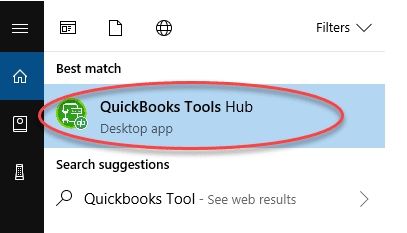
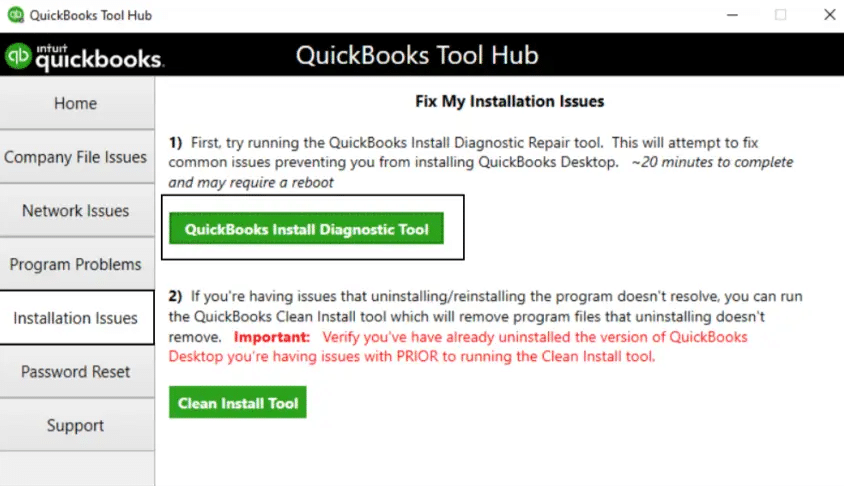
This would fix the Sorry we need to verify your subscription before installing QuickBooks error.
Install the QB Desktop App in Selective Startup
You can install the QB Desktop app in selective startup mode to fix the sorry we need to verify your subscription QuickBooks error with the following steps:
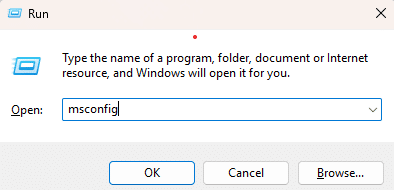
- Press Windows + R to open the Run menu.
- Type in msconfig.

- Press Enter.
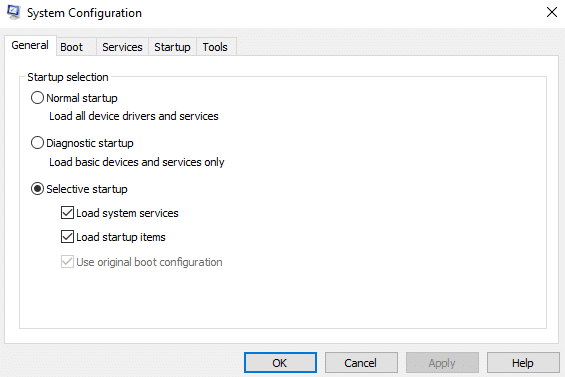
- Navigate to the General tab.
- Click on Selective Startup.

- Select Load System Services.
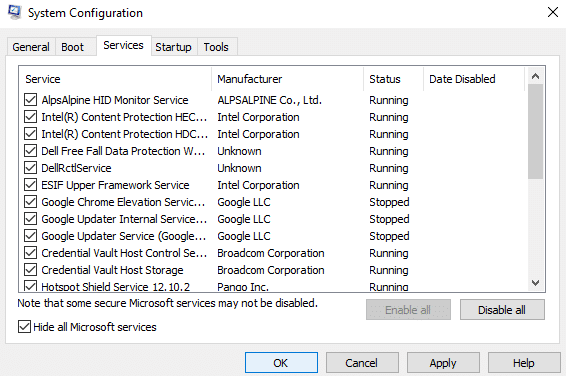
- Now, go to the Services tab.
- Press the Hide all Microsoft services option.

- Hit Disable all.
- Now, unmark Hide all Microsoft services.
- Select Windows Installer from the list of services.
- Hit OK.
- Press Restart in the System Configuration window.
- Install the QuickBooks Desktop app.
- Open msconfig again.
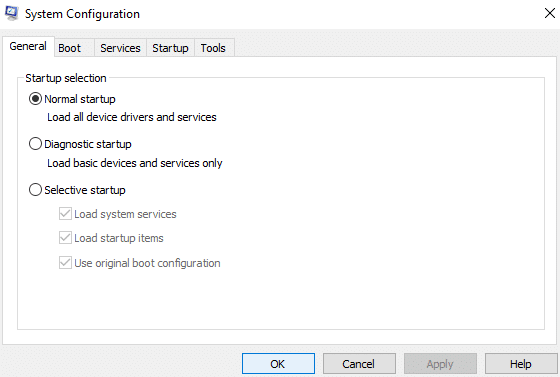
- Go to the General tab.
- Select Normal Startup.

- Hit OK.
- Restart your PC.
This would resolve the QuickBooks Sorry We Need To Verify Your Subscription error.
Install Certificates for QB in Google Chrome
You can install certificates for QB in Chrome to fix the QuickBooks subscription error with the following steps:
- Open your Google Chrome browser.
- Then, go to this website: “https://ratable.qbdt.intuit.com”.
- Click on the padlock symbol in the address bar.
- Press the View Certificates option.
- Click on the Symantec Class 3 Secure Server CA – G4 item from the Certification Path tab.
- Click on View Certificate.
- Press Install Certificate.
- The Certificate Import wizard would open.
- Follow the default options to import.
- Once you see the message that states successful import, hit OK.
- Close the certificate windows.
- Install or update the QBDT app again.
This would resolve the QuickBooks Desktop installation subscription error.
Create Firewall Exceptions for the QB Desktop App
The Windows Firewall blocking QB can be the reason why you are dealing with the sorry we need to verify your subscription QuickBooks error. To resolve it, create Firewall exclusions for the QB Desktop application.
Use Quick Fix My Program
You can use the Quick Fix My Program Tool from the QB Tool Hub if you’re facing a subscription error while updating the QuickBooks app with these steps:
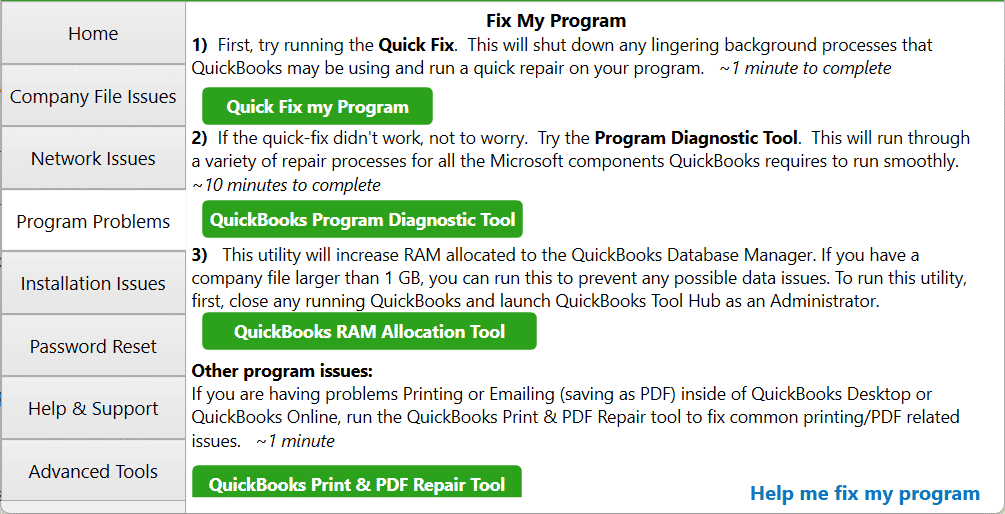
- Open the QuickBooks Tool Hub.
- Go to the Program Problems tab.
- Click on Quick Fix My Program.

- Let the tool run.
Now, the verify your subscription error would be fixed.
Sorry We Need to Verify Your Subscription QuickBooks – A Quick View
Given in the table below is a concise summary of this blog on the topic of the QuickBooks installation subscription error:
| Description | The sorry we need to verify your subscription QuickBooks error can occur while trying to update the QBDT app or install it. This can hamper your workflow and important business processes. |
| Its causes | The Windows Firewall is blocking the QB Desktop app, a problem with a Windows user, third-party apps interfering with the QB installation process, a damaged Microsoft .NET Framework, and outdated billing information in QuickBooks. |
| Ways to fix it | Update the QBDT billing information, restore your product and license info, utilize the QB Install Diagnostic Tool, install QBDT in selective startup, install certificates for QB in Chrome, create Firewall exclusions for the QB app, and use the Quick Fix My Program tool. |
Conclusion
The sorry we need to verify your subscription QuickBooks error can be encountered while trying to install or update the QB Desktop app. We have provided you with the causes and troubleshooting methods needed to resolve this problem in this blog. If you are still facing the same issue, feel free to contact our Accounting Helpline’s experts at 1.855.738.2784 today!
FAQs
Why am I seeing the sorry we need to verify your subscription QuickBooks message?
You might be seeing this message due to these reasons:
– The Firewall is blocking your QBDT app
– There is an issue with a Windows user
– Your billing info in QB is outdated
– Third-party apps are interfering with the QB installation procedure
– A damaged .NET Framework
– Program problems with QuickBooks
How do I fix the QuickBooks verify your subscription to install error?
You can fix this error with these troubleshooting methods:
– Update your billing info in QBDT
– Restore your product and license information
– Use the QB Install Diagnostic Tool
– Install the QBDT app in selective startup mode
– Install certificates in Google Chrome
– Create Firewall exclusions for the QBDT app
– Use Quick Fix My Program
Related Posts-
QuickBooks Error: You and Another User Were Working on This at the Same Time
[Fixed] QuickBooks Merchant Service Not Working 2025
QuickBooks Desktop Combine Reports from Multiple Company Files
The Right Way to Reactivate Payroll Subscription QuickBooks Desktop
QuickBooks Error H101 | 8 Proven Methods to Resolve It
[Resolved] QuickBooks Reactivate Subscription Not Working

Edward Martin is a Technical Content Writer for our leading Accounting firm. He has over 10 years of experience in QuickBooks and Xero. He has also worked with Sage, FreshBooks, and many other software platforms. Edward’s passion for clarity, accuracy, and innovation is evident in his writing. He is well versed in how to simplify complex technical concepts and turn them into easy-to-understand content for our readers.